Showing posts with label ram. Show all posts
Showing posts with label ram. Show all posts
Monday, June 19, 2017
Ram Navami
Ram Navami
The birth of Lord Rama
Ram Nawami is a festival that celebrates the birth of Lord Rama, the son of King Dasharath. It was a joyous occasion in Ayodhya all those centuries ago when King Dasharaths heir was finally born. It was like a dream come true for the king as the lack of an heir had troubled him sorely for many years.

Lord Rama is an avatar of Lord Vishnu who came down to earth to battle the invincible Ravana in human form. Lord Brahma had been receiving complaints from all the gods about the havoc that Ravana was wreaking on earth, but because Lord Brahma had granted Ravana so many boons, he could not be killed by a god. But Ravana had become so overconfident that he would never expect an attack from a human being. So Lord Vishnu agreed to go to earth in the guise of Prince Ram, the son of King Dasharath and Queen Kaushalya.
The story of Lord Rama as told in the great epic Ramayana is one that most Indians know irrespective of caste, creed and religion. Lord Rama is a legendary figure, the epitome of all that is good and true, the man who vanquished the demon king Ravana. Lord Rama is not just a hero, but has been given the status of a god by the Hindus. Therefore, it comes as no surprise that his birth is celebrated year after year with great pomp and enjoyment on the ninth day after the new moon in Sukul Paksh (the waxing moon), which falls sometime in the month of April.
The festivities
So how is Ram Navami celebrated? Some people choose to fast on this day. The diet of such a person would include potatoes made in any form without haldi (turmeric), garlic, ginger or onion. He can also eat fruit and root vegetables of any kind. Curd, tea, coffee, milk, and water are also permitted.
Bhajans praising the exploits of Lord Rama, his loyal brother Lakshman and his devoted wife Sita are sung. The house is swept clean and pictures of Lord Rama, Lakshman, Sita and Hanuman are put on a dais in preparation for the puja. Flowers and incense are kept before the deities. There are two thaalis kept ready in the puja area. One contains the prasad and the other the items necessary for the puja like roli, aipun, rice, water, flowers, a bell and a conch.
First, the youngest female member of the family applies teeka to all the male members of the family. A red bindi is applied on the foreheads of all the female members. Everyone participates in the puja by first sprinkling the water, roli, and aipun on the gods and then showering handfuls of rice on the deities. Then everybody stands up to perform the arti at the end of which ganga jal or plain water is sprinkled over the gathering. The singing of bhajans goes on for the entire puja. Finally, the prasad is distributed among all the people who have gathered for worship.
source Ram Navami
Go to link Download

Friday, April 14, 2017
Puppy Linux A Linux distribution that runs completely on RAM
Puppy Linux A Linux distribution that runs completely on RAM
Puppy Linux : A Linux distribution that runs completely on RAM
Over years size of software along with processing power of computers have increased considerably , i still remember the first Linux distribution i used was Red Hat Linux 5.2 came on a single CD , now RHEL or Fedora comes on a DVD or 5-6 Cds , even Windows has grown tremendously in size , memory requirement have zoomed the latest Windows Vista requires almost 2GB of Ram and a fast processor to run flawlessly. Now here is a shocker Puppy Linux is a Linux distribution that is only 28-70 Megabytes in size and come fully featured Graphical Desktop with Web Browser , Word Processor , Download
According to Puppy Linux Website the goal of Puppy Linux is to create a Linux distribution that is user friendly , quick to run and include all the applications that user needs .
Installing puppy Linux is not all that difficult download the ISOs from their website and burn it on a cdrom now after this boot from the cdrom on booting puppy Linux it asks a number of questions regarding Hardware Configurations , Video Card and Monitor and stuff ,after completing these steps Puppy Linux boots into impressive graphical desktop in less than a minute . You dont have to enter these information everytime you boot they can be saved on hard-disk or USB Flash memory or burned on a cd so that you dont have to enter these information everytime you boot Puppy Linux . Now i have to admit i wasnt expecting such a good graphical environment on puppy Linux considering it is only 70 Megabytes in size . The user interface was extremely responsive helped by the fact it was running entirely on RAM and it wasnt accessing data from hard disk frequently which is significantly slower than accessing data from RAM .
Now Puppy Linux since aims to be a distribution for newbies so icons were very logically named write , draw , connect and other user friendly captions were provided for different programs , So that new Linux user dosent have any problem recognizing programs which he might have not seen earlier .
This is how Puppy Linux Desktop Looks : -

What is included ?
Some of the important Application that are included with Puppy Linux includes : -
1. Sea Monkey Web browser
2. AbiWord Word Processor
3. Ghostview PDF Viewer
4. Axel Download Accelator
5. Dillo Web browser
6. Gxine Media player
7. DVD Video ripper ( :) )
8. Gnumeric Spreadsheet Program
9. Inklite Vector Editor
10. mtPaint
11. A collection of small games
and other programs
Now i access Internet through LAN , i had no problem installing LAN on puppy Linux it provides a very useful graphical tool for configuring Internet connection through LAN or modem .

The Web Browser that is included with Puppy Linux is Sea Monkey which is based on Mozilla code base same as Mozilla Firefox. I Did not encounter any problem in using Internet through Sea Monkey most of the website rendered without any problem . Even Macromedia/Adobe Flash Extensions was installed by default this is really wonderful packing in fully functional web browser with Macromedia flash plug in along with other applications in 70 megabytes .
 Browsing Internet through Sea Monkey Web Browser
 Gnumeric : A Lightweight Spread Sheet program that is quite usable
 Media Utility Tool to Mount drives
Now Gxine in Puppy Linux comes with number of codecs though w32codecs package is not installed by default so some audio/video files may not play well but most of the popular ones did play without any problem i tried playing avi,mpg ,Video CDs and other files all played well with minor adjustments .
 Gxine : A Media Player included with Puppy Linux based on Xine Framework
Even though Puppy Linux comes with wide array of application you can install more application from puppys application repositories , Puppy Linux uses (.pup) files for applications and if you cannot find particular installation file you can also use debian packages for installing applications on Puppy using alien . Puppy Linux uses different file format for installing application since Puppy Linux is not based on any other Linux distribution but was created from scratch by Puppy Linux creator Barry Kauler.
If you are feeling bored there are collection of neat games that comes with puppy linux enabling you to have fun on puppy Linux .
 Classic Mine Sweeper game comes pre-installed with Puppy
 Drawing tool that come pre-installed with Puppy Linux
Article written by : -
Ambuj Varshney (blogambuj(at)gmail.com)
for Linux on Desktop , (C) 2007
Go to link Download
Tuesday, October 4, 2016
RAM Manager Pro v8 0 9 APK For Android
RAM Manager Pro v8 0 9 APK For Android
This application optimizes the RAM of all android devices and gives you better performance. We tested and we’re still testing the best RAM balance which makes your system as fast as possible. This application improves perfomance of your device in all directions.
ROOT IS REQUIRED!!!
Switching between applications is very fast, your system will be smoother then ever before. You can fully use your multitasking and you still have as much memory as you need.
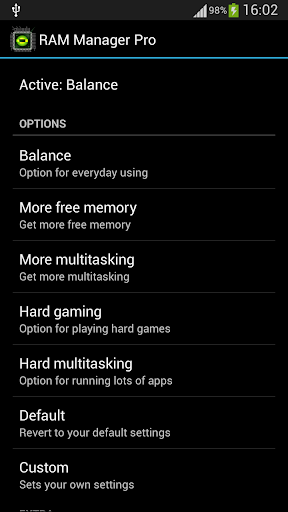
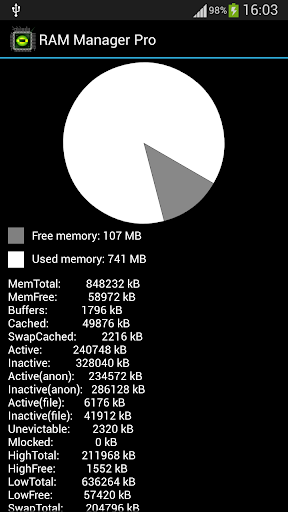
Features:
- Balance – Option which makes your RAM to the best optimization, this option is for everyday using. Use this option when you want to have fast phone without lags.
- Balance (More free memory) – This option is nearly the same as Balance, but this option should be advantageous for users who have more RAM than 512 MB. This option gives you more free memory but a bit reduces multitasking.
- Balance (More multitasking) – This option is nearly the same as Balance, but this option should be advantageous for users who have less RAM than 512 MB. This option gives you more multitasking, but a bit reduces free memory.
- Hard Gaming – Option which stabilizes your RAM for playing hardest games. Use this option for games which lag on your phone. Your games will run smooth without lags.
- Hard Gaming (Less aggressive) – This option is similar to Hard Gaming but should be better for devices with RAM lesser than 512MB.
- Hard Multitasking – Option for users which are really hard working on their phones. You can have a lot of running apps and quickly switch between them without lags.
- Default (Samsung) – Default settings by Samsung, these settings are also used by LG, HTC, etc.
- Default (Nexus S) – Default settings which are used by all Google devices.
- Default – This option reverts your RAM to your default settings, which you had before you installed this app.
- Lock launcher in memory
- VM Heap size
- Memory info
- Free memory meter
- Charging limit (only works on some kernels)
- Widget
Chosen option is automatically set on each reboot.
You can easily switch between all options without rebooting.
This application is the best solution for all who have problem with free memory, with multitasking, with slow swapping between applications or with slow performance of your device. I recommend to use this application to everybody who wants have better phone, because this application increases speed of your phone and other parameters which depend on RAM.
What’s in this version : (Updated : Dec 23, 2015)
- Improved Russian translation
- Fixed feature “Clean memory” for Android 5 and higher
- Fixed minor issues
- Required Android O/S : 2.1+
======================================================================
Download Link
Size 250 KB
SolidFiles | Tusfiles | DataFileHost | ZippyShare
======================================================================
Source Here
Go to link Download
Friday, September 30, 2016
Ramblow Version 1 00 S60V3 V5 Aplikasi Untuk Meningkatkan Kapasitas Memory RAM Pada Sistem Ponsel Symbian
Ramblow Version 1 00 S60V3 V5 Aplikasi Untuk Meningkatkan Kapasitas Memory RAM Pada Sistem Ponsel Symbian
Ramblow V 1.00 Full Version

Ramblow adalah perangkat software untuk ponsel Symbian yang memiliki kemampuan me-recovery (mengembalikan) kapasitas memory RAM dengan cara menghapus semua sistem-sistem yang sedang beroperasi di ponsel Symbian kamu baik secara manual serta secara otomatis.
Fitur Ramblow V 1.00 :
- Mengawasi serta mengatur secara manual aplikasi yang sedang beroperasi pada ponsel.
- Mempertahankan jumlah memory yang tersedia supaya pengoperasian ponsel tetap nyaman digunakan.
- Mengoptimalkan penggunaan memory untuk large applications.
- Cleanup, memberi ruang bebas memory secara otomatis dengan mengatur waktu idle (pada saat ponsel tidak digunakan minimal 10 menit) dengan cara menghapus semua sistem aplikasi yang sedang berjalan.
- Menutup aplikasi yang tidak diperlukan secara manual.
- Report, memberikan informasi secara detail dari hasil eksekusi.
Report

- Maximal released 8,52 mb.
- Memory boost.
- Protect foreground app, melindungi sistem aplikasi yang tidak ingin kamu berhentikan pengoperasiannya.
- Background Ramblow yang dapat kamu ubah.
Setup

- Task view, menampilkan daftar aplikasi-aplikasi yang sedang berjalan pada ponsel.
Task view

- Restart ponsel.
Download Ramblow V 1.00 Full Version
Go to link Download
Subscribe to:
Posts (Atom)