Tuesday, June 13, 2017
Password recovery hostname changes in linux
Password recovery hostname changes in linux
( PS: Folks..if you think you are too dumb to do
that, there exists an automated "burn-the-cd-boot-&-forget-solution"
called KONBOOT which can reset Linux passwords if you care.. :D choose your pick )
I actually rebooted the system & once I reached grub,selected the kernel, I pressed "e".I proceeded to 2nd line of configuration & pressed "e" again.
kernel /boot/vmlinuz-2.6.34.6-47.fc13.i686 roObviously, I edited the file by pressing "e" again & modifying it by typing "single" for invoking single user mode in Linux.
kernel /boot/vmlinuz-2.6.34.6-47.fc13.i686 ro singlePress "b" key to boot. Afterwards, you are given a prompt, please enter "passwd" command to reset root password.
After that, login as root & then proceed to move to /etc/shadow
[root@zion XERO]# cd /etc& check the entry for root,it should look similar to this
[root@zion etc]# vi shadow
root:$6$McKhE96JGhl$uIfjBcMrrrL2x8aJ17mATex8WNXVMvZXrsfqoOL.
CinR9W2C8VXVyt4W2yt4eAJ0tgNPU2Kftr1f/lcvDG.:14859:0:99999:7::1:
you can see there is a "1" in last entry which sets the root account to expire. remove it such that it becomes
root:$6$McKhE96JGhl$uIfjBcMrrrL2x8aJ17mATex8WNXVMvZXrsfqoOL.
CinR9W2C8VXVyt4W2yt4eAJ0tgNPU2Kftr1f/lcvDG.:14859:0:99999:7:::
Once done, save the file & exit by pressing :wq! in vi. After that, boot into graphical mode by typing
[root@zion XERO]# init 5login with your password."root" problem solved :) After wards..i found out that my hostname was changed..so, here are three easy ways to change your hostname on your will.
Way 1
open console, & type
[root@zion XERO]# hostnamenow you can reset hostname (for the given session) by typing -
NETWORKING=yes
HOSTNAME=hosty.test.com
[root@zion XERO]# hostname myhostname.mysite.comwhere myhostname.mysite.com is your new hostname.
WAY 2
The second way deals with editing a file known as "network" located in /etc/sysconfig/network, navigate to it
[root@zion XERO]# cd /etc/sysconfig/check the value of hostname in it
[root@zion sysconfig]# cat networktime to change it, go to vi & edit it.
NETWORKING=yes
HOSTNAME=hosty.test.com
[root@zion sysconfig]# vi networksaved the file..reboot & its done :)
NETWORKING=yes
HOSTNAME=myhost.testsite.com
~
~
~
:wq!
WAY 3
The third way deals with "sysctl" command, which can be used to change the variable kernel.hostname. Start by checking its current value by typing
[root@station3 sysconfig]# sysctl kernel.hostnameand to change it, enter
kernel.hostname = hosty.test.com
[root@station3 sysconfig]# sysctl kernel.hostname=MYHOST.TESTSITE.COM
where MYHOST.TESTSITE.COM is your new hostname. All of this was scripted,tested in FEDORA 13 (2.6.34.6-47.fc13.i686) & written using Scrib Fire
.
I hope it was interesting :)
Like This post ? You can buy me a Beer :)
Posted by XERO. ALL RIGHTS RESERVED.
Go to link Download

Saturday, April 22, 2017
Password Recovery Disk
Password Recovery Disk
Take preventive measures against losing user-level passwords.It doesnt matter if you never again remember a Windows user password. Thanks to XPs Forgotten Password Wizard, your conscience will be free and clear -- should your mind happen to accidentally misplace your user password.
I highly suggest you create a password recovery disk the minute you create your user account. Why? In order to create a password recovery disk youre going to need your password. Write it down the minute you create your user account and then proceed to creating your very own password recovery disk.
Heres how to launch the Forgotten Password Wizard:Single-click Start menu, Control Panel, and User Accounts.
Click your user account name.
Under Related Tasks on the left, click "Prevent forgotten password" to launch the wizard.Now that youve launched the wizard, let it walk you through creating the recovery disk. Make sure the disk you use is formatted and in the drive. After its finished creating the disk, label it and stash it away for an emergency.
If you happen to forget your password, all you need to do is click your user icon at the logon screen. Even though you dont have your password, go ahead and click the green arrow just like you would to finish logging on to your computer. This will launch a little yellow dialog box directing you to use your password recovery disk.
Go to link Download
Monday, April 3, 2017
Rar Password Unlocker 3 0
Rar Password Unlocker 3 0

Full Software | Click Here
Go to link Download
Sunday, March 26, 2017
RAR Password Unlocker Crack
RAR Password Unlocker Crack


- Earn $25 for each referral*
- Even better, your friends will earn $25 too!

Our Facbook Page
Notre page de Facebook


Go to link Download
Thursday, March 16, 2017
Rangs J10 Flash File 100 tested free Without password
Rangs J10 Flash File 100 tested free Without password
Go to link Download
Wednesday, February 15, 2017
RAR Password Unlocker 4 2 0 0 Crack
RAR Password Unlocker 4 2 0 0 Crack
 Halo sobat , ketemu lagi .. Pernahkah anda download tetapi filenyya di kompres dalam bentuk zip / rar,dll tetapi ketika mengekstrack, anda dimintai password dan kebetulan ngak tau passwordnya maka yang anda download tu percuma donk .. Jawabannya ada pada software RAR Password Unlocker 4.2.0.0. RAR Password Unlocker 4.2.0.0 + Crack merupakan software utilities yang berguna untuk membobol/mengetahui password winrar/ rar ataupun winzip / zip..
Screenshot :

Silahkan dicoba:
Download RAR Password Unlocker 4.2.0.0 + Crack
via ziddu - 3.25 Mb
Selamat Mencoba !!
Go to link Download
Monday, January 30, 2017
Password Unlocker Bundle 5 5
Password Unlocker Bundle 5 5

click here
Go to link Download
Friday, January 20, 2017
Password printer sharing win 7
Password printer sharing win 7
Bagi yang menggunakan windows XP atau Vista mungkin tidak ada masalah dalam hal sharing printer. Masalah spele dikala darurat terkadang membingungkan. Pada win 7 ada proteksi sharing yang menampilkan penolakan berupa password, padahal password admin maupun user di masukkan tetap saja minta yang namanya password.
Caranya sangat gampang-pang dari komputer yg terpasang printer:
– Buka Open Network and sharing center
– Change advanced sharing settings
– Geser mouse ke bawah hingga tampak File and Printer Sharing seperti gambar dibawah:
– Klik Tutn off file and printer sharing
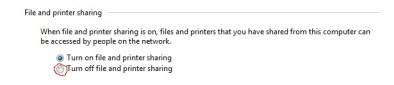 selamat mencoba….
Go to link Download
Saturday, January 14, 2017
Protect your USB Drive with Password without Software
Protect your USB Drive with Password without Software
Do you’ve some important data in your USB drive that you don’t want to share with anybody? It may be some documents, username/passwords or images/videos. Then why not encrypt the USB drive data with password? And if you’re using Windows7, you don’t even need any third party software for password protecting portable drives.
Go to link Download
Monday, December 26, 2016
Rar Password Recovery v1 1 Crack
Rar Password Recovery v1 1 Crack
 Hai sobat saya kembali lagi nih .. Kali ini saya akan membagikan Rar Password Recovery Untuk solusi rar yang terkunci / lupa password winrar ..RAR Password Recovery ini dipercaya dapat menemukan password dari RAR dengan menggunakan teknik "Brute Force" (mencoba secara paksa seluruh kombinasi huruf dan angka yang memungkinkan sebagai password RAR tersebut).RAR Password Recovery adalah alat yang ampuh untuk memulihkan, hilang/lupa password untuk RAR / WinRAR (v2.xx dan v3.xx) arsip.
Kelemahan dari teknik "Brute Force" ini adalah waktu yang digunakannya sangatlah lama. untuk password dengan 10 karakter atau lebih, mungkin password akan ditemukan setelah 3x24 jam.
- Fitur Fiturnya:
* Pulih password untuk RAR / WinRAR arsip versi 2.xx dan 3.xx menggunakan kombinasi Brute-Force dari, Booost-Up atau serangan Kamus.
* Sangat kecepatan tinggi kerja (lebih dari 3000 password per detik di Brute-Force mode dan sampai 22000 password per detik di Booost-Up mode).
* Customizability.
* Lanjutan prosesor heuristik.
* User-friendly interface.
* Kamus besar wordlist.
* Kemampuan untuk bekerja di latar belakang.
* Fitur autosave.
Note!!!
For Windows 95/98/ME/2k/XP/2003..
Download Now !!
via ziddu - 1.25 Mb

TESTED !! By ~PluzsoftwarE~
Semoga Bermanfaat
^_^
Go to link Download
Friday, December 9, 2016
Rar Password Unlocker Crack Patch and Registration Keys v4 2 incl Full Version Free Download
Rar Password Unlocker Crack Patch and Registration Keys v4 2 incl Full Version Free Download
Rar Password Unlocker Crack ,Patch and Registration Keys v4.2 incl Full Version Free Download

RAR Password Unlocker Pro 4.2 Full is proved to be a helpful tool when you forgot WinRAR/RAR password and cannot open the RAR archives. It can recover RAR password at high speed via 3 attack options: Brute-force, Brute-force with user-defined Mask and Dictionary. Support all RAR files created by any tools
Recover RAR password faster with SSE, etc. Support multi-core CPU and GPU acceleration 3 efficient password attack options available Save password recovery process automatically Shut down computer automatically after recovery.
Key Features
- Powerful WinRAR Recovery Tool Quickly recover forgotten passwords from encrypted RAR archives (*.rar) created by any applications, including the latest version of WinRAR. Unlock any password-protected RAR archive no matter what compression and encryption algorithm is used.
- Recover Fast with GPU & Multi-core CPU
- Recover RAR password at high speed by using advanced SSE technology and new search algorithm.
- Allow you to accelerate RAR password recovery with Multi-core CPUs, NVIDIA CUDA GPUs and ATI OpenCL GPUs.
Brute-force Attack Try all possible password combinations when you have no idea about it.
Brute-force Attack with Mask Greatly reduce the recovery time by specifying the forgotten password length, character set, etc. (High Recommended)
Dictionary Attack Recover lost RAR password by trying the password combinations in the built-in dictionary as a password. Self-created dictionary in any language is also supported.
Search for Encrypted Files
Search feature helps you find your encrypted RAR archives easily and fast by scanning your PC. You can select the type of scan you want to use and scan specific files from your entire computer system to one or two selected folders.
Auto -save Recovery State
Stop and resume your password recovery process anytime through the auto-save feature. This RAR password cracker can automatically save your password recovery state.
Rar Password Unlocker 4.2 Serial numbers and codes included Full Version Free Download from links given below.
Download Now
Go to link Download
Saturday, November 5, 2016
Password Cracking Guide
Password Cracking Guide
The goal is to unify all of the good information found in various bits and pieces into 1 large document. This document is for people who want to learn to the how and why of password cracking. There is a lot of information being presented and you should READ IT ALL BEFORE you attempted doing anything documented here. I do my best to provide step by step instructions along with the reasons for doing it this way. Other times I will point to a particular website where you find the information. In those cases someone else has done what I attempting and did a good or great job and I didn’t want to steal their hard work. These instructions have several excerpts from a combination of posts from pureh@te, granger53, irongeek, PrairieFire, and stasik. I would also like to thank each of them and others for the help they have provided me on the BackTrack forum.
I had to compress the document so I could attach it. The document as it stands now is 127K. Please let me know if what I have is wrong, or if there is a better way to do something, or if I am missing something. I am planning on making enhancements as people make me aware of them.
Here is the table of contents
1 LM vs. NTLM
2 Syskey
3 Cracking Windows Passwords
 3.1 Extracting the hashes from the Windows SAM
 3.1.1 Using BackTrack Tools
 3.1.1.1 Using bkhive and samdump v1.1.1 (BT2 and BT3)
 3.1.1.2 Using samdump2 v2.0.1 (BT4)
 3.1.1.3 Cached Credentials
 3.1.2 Using Windows Tools
 3.1.2.1 Using fgdump
 3.1.2.2 Using gsecdump
 3.1.2.3 Using pwdump7
 3.1.2.4 Cached Credentials
 3.2 Extracting the hashes from the Windows SAM remotely
 3.2.1 Using BackTrack Tools
 3.2.1.1 ettercap
 3.2.2 Using Windows Tools
 3.2.2.1 Using fgdump
 3.3 Cracking Windows Passwords
 3.3.1 Using BackTrack Tools
 3.3.1.1 John the Ripper BT3 and BT4
 3.3.1.1.1 Cracking the LM hash
 3.3.1.1.2 Cracking the NTLM hash
 3.3.1.1.3 Cracking the NTLM using the cracked LM hash
 3.3.1.1.4 Cracking cached credentials
 3.3.1.2 John the Ripper - current
 3.3.1.2.1 Get and Compile
 3.3.1.2.2 Cracking the LM hash
 3.3.1.2.3 Cracking the LM hash using known letter(s) in known location(s) (knownforce)
 3.3.1.2.4 Cracking the NTLM hash
 3.3.1.2.5 Cracking the NTLM hash using the cracked LM hash (dumbforce)
 3.3.1.2.6 Cracking cached credentials
 3.3.1.3 Using MDCrack
 3.3.1.3.1 Cracking the LM hash
 3.3.1.3.2 Cracking the NTLM hash
 3.3.1.3.3 Cracking the NTLM hash using the cracked LM hash
 3.3.1.4 Using Ophcrack
 3.3.1.4.1 Cracking the LM hash
 3.3.1.4.2 Cracking the NTLM hash
 3.3.1.4.3 Cracking the NTLM hash using the cracked LM hash
 3.3.2 Using Windows Tools
 3.3.2.1 John the Ripper
 3.3.2.1.1 Cracking the LM hash
 3.3.2.1.2 Cracking the NTLM hash
 3.3.2.1.3 Cracking the NTLM hash using the cracked LM hash
 3.3.2.1.4 Cracking cached credentials
 3.3.2.2 Using MDCrack
 3.3.2.2.1 Cracking the LM hash
 3.3.2.2.2 Cracking the NTLM hash
 3.3.2.2.3 Cracking the NTLM hash using the cracked LM hash
 3.3.2.3 Using Ophcrack
 3.3.2.3.1 Cracking the LM hash
 3.3.2.3.2 Cracking the NTLM hash
 3.3.2.3.3 Cracking the NTLM hash using the cracked LM hash
 3.3.2.4 Using Cain and Abel
 3.3.3 Using a Live CD
 3.3.3.1 Ophcrack
4. Changing Windows Passwords
 4.1 Changing Local User Passwords
 4.1.1 Using BackTrack Tools
 4.1.1.1 chntpw
 4.1.2 Using a Live CD
 4.1.2.1 chntpw
 4.1.2.2 System Rescue CD
 4.2 Changing Active Directory Passwords
5 plain-text.info
6 Cracking Novell NetWare Passwords
7 Cracking Linux/Unix Passwords
8 Cracking networking equipment passwords
 8.1 Using BackTrack tools
 8.1.1 Using Hydra
 8.1.2 Using Xhydra
 8.1.3 Using Medusa
 8.1.4 Using John the Ripper to crack a Cisco hash
 8.2 Using Windows tools
 8.2.1 Using Brutus
9 Cracking Applications
 9.1 Cracking Oracle 11g (sha1)
 9.2 Cracking Oracle passwords over the wire
 9.3 Cracking Office passwords
 9.4 Cracking tar passwords
 9.5 Cracking zip passwords
 9.6 Cracking pdf passwords
10 Wordlists aka Dictionary attack
 10.1 Using John the Ripper to generate a wordlist
 10.2 Configuring John the Ripper to use a wordlist
 10.3 Using crunch to generate a wordlist
 10.4 Generate a wordlist from a textfile or website
 10.5 Using premade wordlists
 10.6 Other wordlist generators
 10.7 Manipulating your wordlist
11 Rainbow Tables
 11.1 What are they?
 11.2 Generating your own
 11.2.1 rcrack - obsolete but works
 11.2.2 rcracki
 11.2.3 rcracki - boinc client
 11.2.4 Generating a rainbow table
 11.3 WEP cracking
 11.4 WPA-PSK
 11.4.1 airolib
 11.4.2 pyrit
12 Distributed Password cracking
 12.1 john
 12.2 medussa (not a typo this is not medusa)
13 using a GPU
 13.1 cuda - nvidia
 13.2 stream - ati
P.S. Thank you everyone for your feedback. Keep it coming.
Changes from version 0.1
* Added a section on plain-text.info
* Added a section on using john the ripper with a custom character list
* Added Xploitz’s and pureh@te’s wordlists
Changes from version 0.2 - 200 downloads
* Added sections on using ophcrack
* Added sections on Cain and Able under windows
* Fixed a typo
* New html format
Changes from version 0.3 - 410 downloads
* Moved some content to where it should have been
* Added a section on crunch
* Fixed typos
* Fixed a whole lot of html issues
* Slightly rearranged things to flow better
Changes from version 0.4 - 877 downloads
* Added a section on cached credentials
* Expanded the Novell section
* Fixed typos
* Fixed a couple of html errors
* Moved some things around
* New utility to dump passwords
Changes from version 0.5 - 1573 downloads
* added wpa pw-inspector command
* added a wordlist manipulation section
* added usage of fgdump
* added rcracki section
* added a sample hash.txt to play with
* john can be used for input to aircrack-ng
* moved a few things around for a better flow
Changes from version 0.6 - 422 downloads
* added a section on generating a wordlist from a website
* added head, tail, and sed commands to wordlist manipulation
* added a section on xhdrya (pointing to Pureh@tes video)
* added a section on gsecdump
* added a section on medusa
* added a section on cisco
* expanded the crunch section
* moved everything around in an effort to make things easier to find
* the dumbforce and knownforce are not finished
Changes from version 0.7 - 4596 downloads
* Fixed john --incremental=All --stdout | aircrack-ng -b 00:11:22:33:44:55 -w --test.cap
missing a - Thanks to roblad for pointing it out
Changes from version 0.8 - 302 + 1226 (old forums + new)
* updated the guide to support BT4-Pre-Final
* switched from transitional html to strict html
* added a section on cracking office passwords
* added a section on cracking rar passwords
* added a section on cracking zip passwords
* added a section on cracking pdf passwords
* added instructions for remote password dumping for fgdump
* point users to john the ripper wiki for dumbforce and knownforce usage
* convert text urls to links
* updated links
* update versions of software (wine and rcrack)
* fixed several spelling mistakes
Changes from version 0.9
* updated the guide to support BT4 Final
* fixed links to pureh@tes videos
* added instructions to update flash so you can watch videos clearly
* updated the john the ripper section to current versions
* added instructions for using rainbow tables for WPA cracking
* added two new leetifing scripts
* added a small cupp discussion
* added a section on pyrit
* added a section
Go to link Download
Thursday, October 27, 2016
Password ေတြ strong ျဖစ္ၾကရေလေအာင္
Password ေတြ strong ျဖစ္ၾကရေလေအာင္

Computer ????????? ???????????? password ?????? ?????????????????????? ?????????? ??????????? ??????????????? ???????? ??????????? ????? ????????? ??????? ???????? ????????? ???????? ?????????????? Password ? ??????????? ???????? ?????????????? ????????????????? ?????????? ?????????? ????????????????????????? ?????????????????? ???????? ????????????????
Password ?????????????????? ????????? ?????? ? ??????????????????? ??????? ????????? ? ?????? upper-case ? lower-case ? special character ??????? ???????????? ???????????????????
???????? ???????????? ?????????? ?????????????? [eg. O (???) ???? 0 (zero) ? A ???? 4 ? L ???? 1 ? 3 ???? E ]
????????? ??????????? one ? two ? three ??????? ??????????? ?????????????
Upper-case (capital) ????????? ??????? ??????? ??????????? ??????? (eg. bLue ? happY)
Special character ?????????? (!@#$%^&*( ) { } [ ] ????????? ???????? ????????? ??????????????? ??????????????? (eg.happy 31=h@ppY3! ? H = !-L)
????????????? ????????? ????????? ???????
?????????????????? ?????????????????
(eg-serious=sirius ? Class = Klass)
Password ?????? ???????? ??????????? ?????????????????? ??????????????? hacker ???????? ????? ???????? password ??? ???????????? ???????? password ?????? ??????? ??????????????????
Friday frYday! Robert #rob ERt# 19 Peach Place One9peacHpl! I love Jill eYelov3Jill My dog Fritz Meyedogfr1tZ
??????????? ?????????????????? ??????????? ???????????? ?????????????? ????? upper-case ? lower-case ? ?????????? special character ??? ??????????? ?????????? ?????????? ???????? ????????? ??????? ????????????? ????????????? security policy ??? ?????????????????? ???????????? ????????? social networking ??????????? bank information ??????????????? ?????????? ???????????????
Ref: ??????????
PC World Myanmar ( May 2010 )
Go to link Download
Wednesday, October 19, 2016
PLDT MY DSL ADMINISTRATOR PASSWORD AND LOGIN CHANGING
PLDT MY DSL ADMINISTRATOR PASSWORD AND LOGIN CHANGING
How to change Admin Password for PLDTmyDSL WiFi router
Because there are many default user and admin password can be found at Google for router and modem.
It better to change the default password to protect your internet connection account.
Example here is Model :Speedsurf 504An
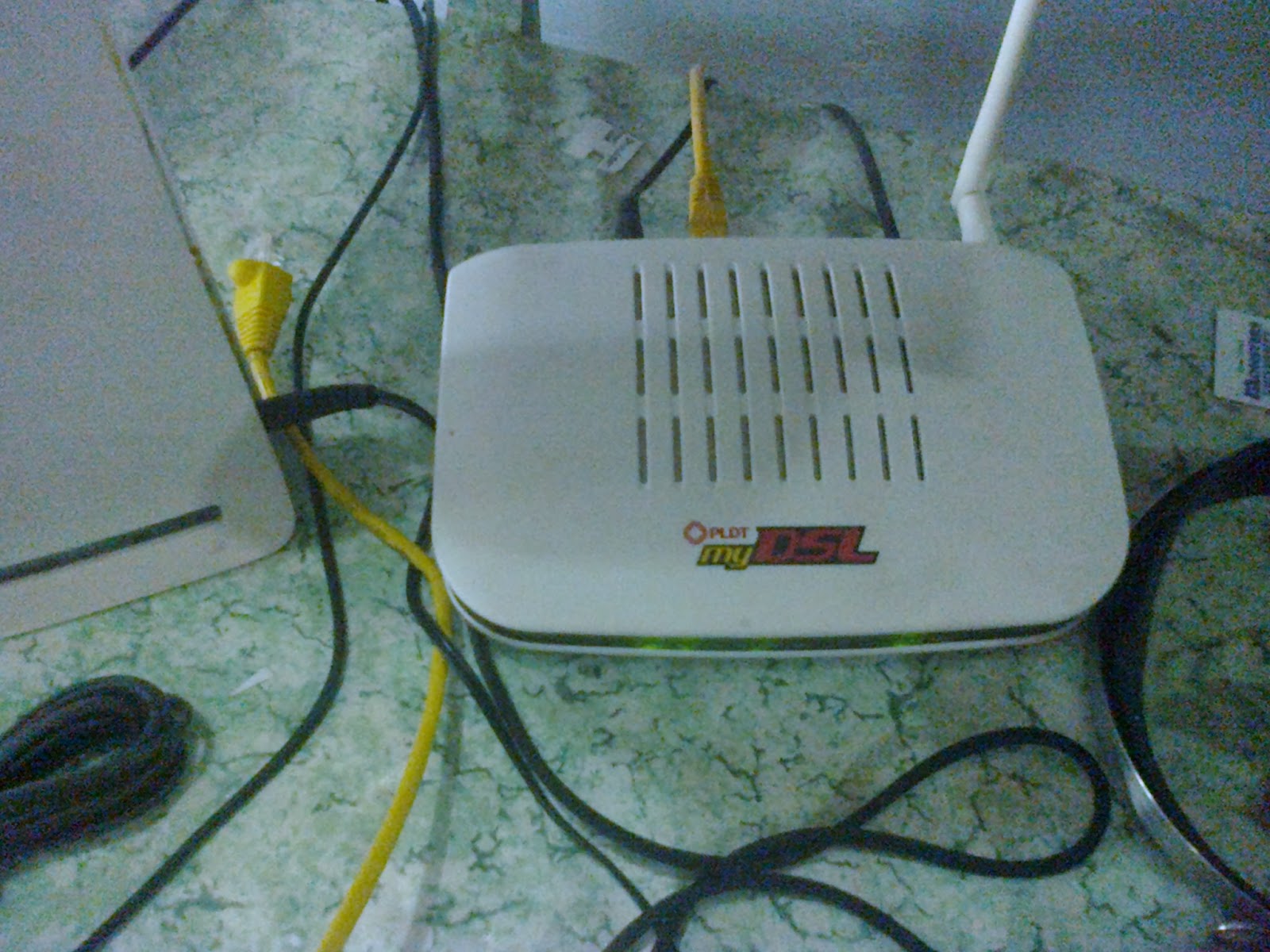
This what I did step by step.
1. plug your my DSL router in your PC/ Laptop via LAN then when status connected open your fave browser type this IP address 192.168.1.1 and a box pop out will request log in type this.
Default user with admin rights (eto ang dapat gamitin complete tab and privilege)
User Name: adminpldt
Password: 1234567890
Default user ONLY No admin access ( huwag nyo gagamitin eto kulang tabs)
User: admin
Pass: 1234
PLDT Fibr
user: admintelecom
pass: telecomadmin
(pag ayaw ng adminpldt do a Hard Reset press the reset button for 2 minutes)
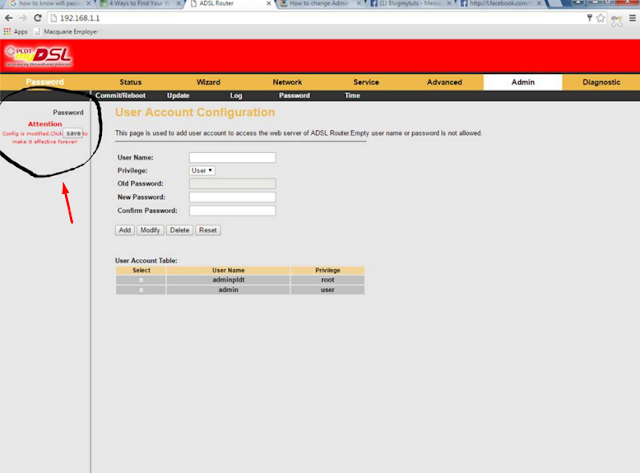
2. Go to Admin Panel click Password then select by click the dot which one you want to change password.
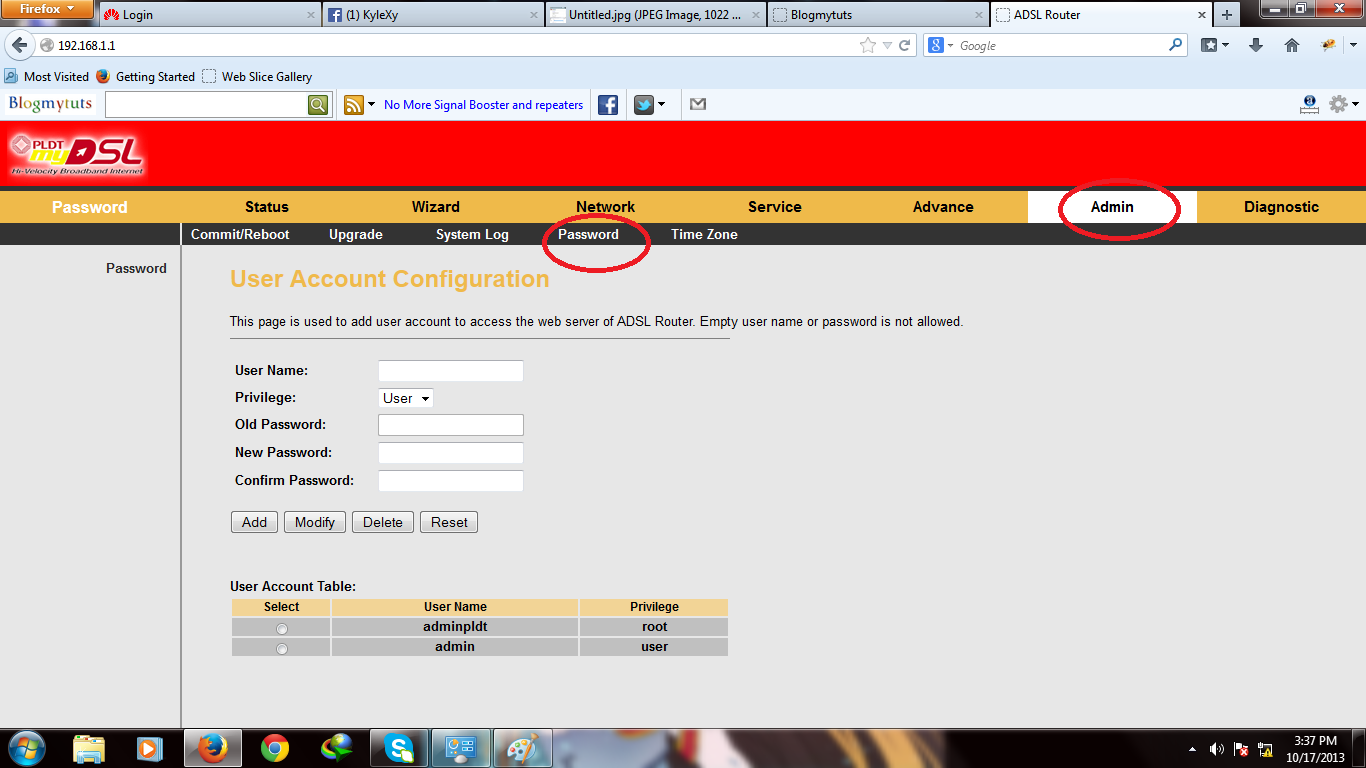
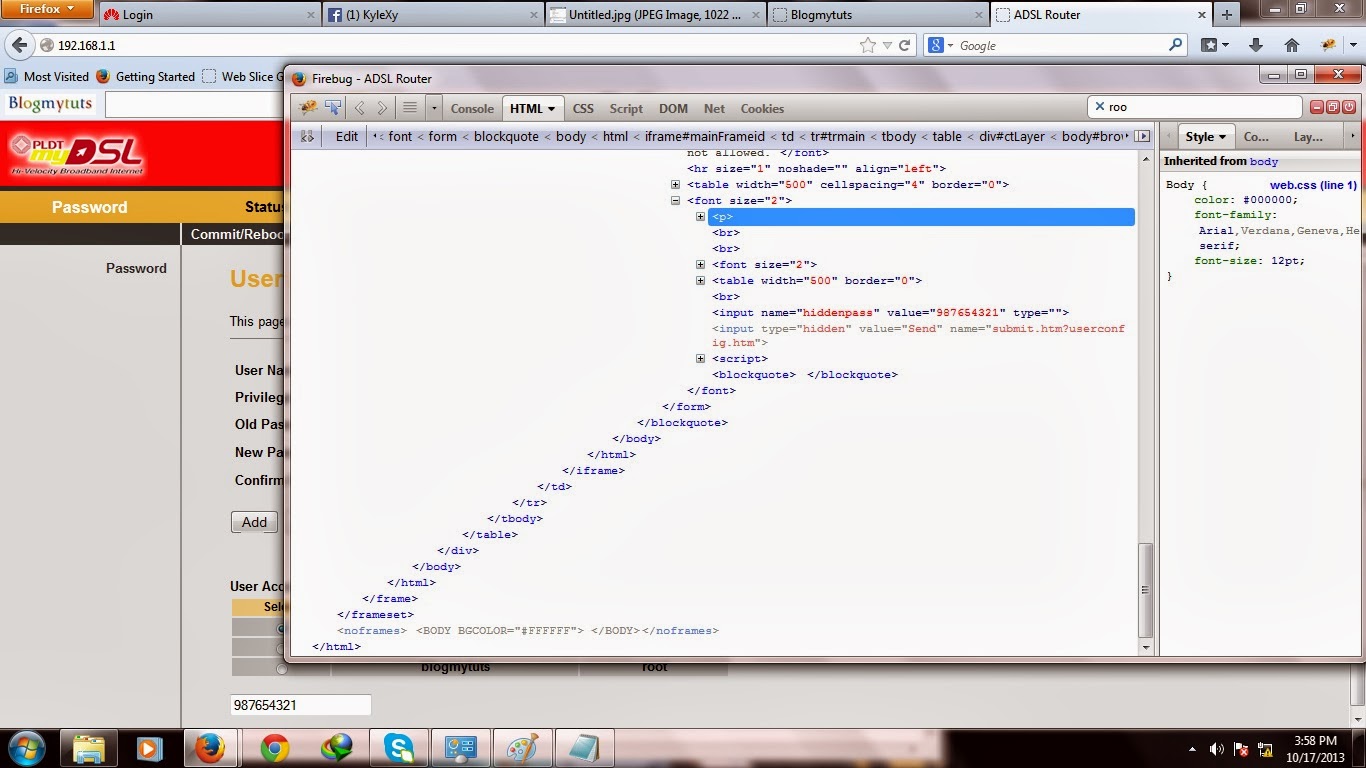
Proof that i have change the admin pass show the hidden password on elements.

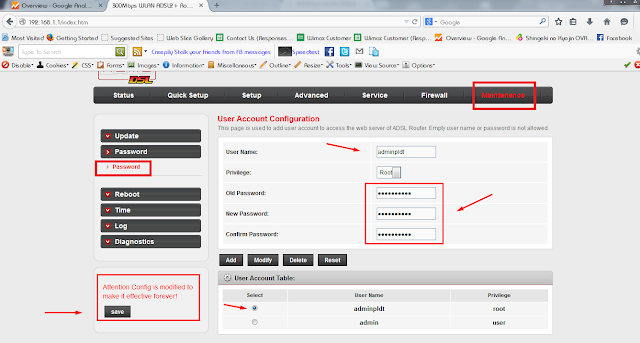
For Other Model like BroudTec
Maintenance -Password tab
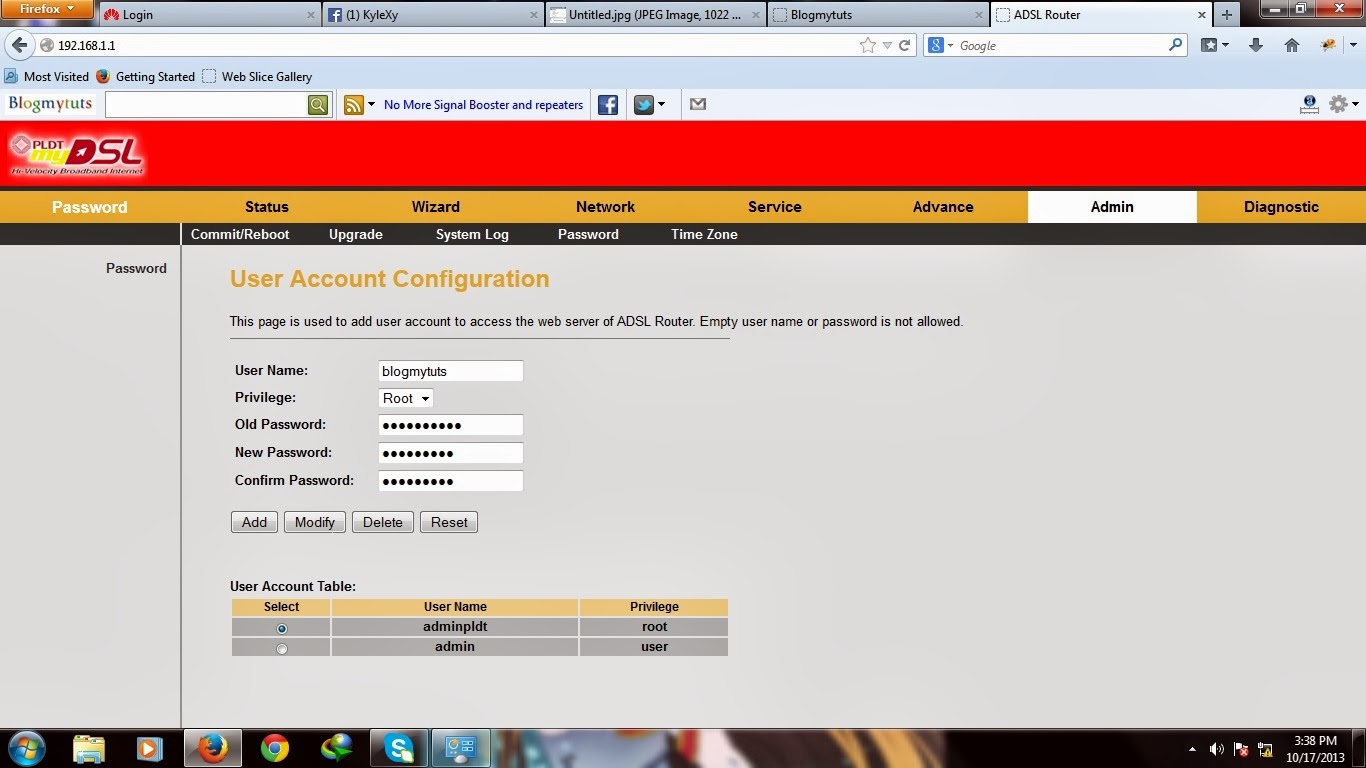
You can add user here too..
Go to link Download