Friday, June 9, 2017
Protect Your Chrome From Malware Adware Extensions With ExtShield
Protect Your Chrome From Malware Adware Extensions With ExtShield
Most of the people dont realise that browser extensions might be dangerous .But why they download & installing it?.May be they are too lazy to download and install a software with the same functions as the extension, or it may save some time or it is a faster way to explore lots of features in a short time.After installation, the malicious extension can gain complete control of the victim’s profile and may have access to your data.By installing these extensions, you give your browser additional functionality unknowingly . So don’t install an app or extension unless you trust its creator.
ExtShield (formerly Chrome Protector)tells you that you need to download Google Chrome in order to run it. It keeps a more than 100s of blacklisted browser extensions known to contain adware, spyware or malware.It will scan your browser and alert you if any of these are installed.
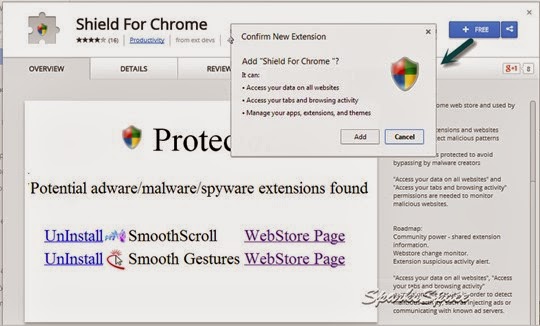
ExtShield extension is a freeware available at Chrome webstore. Once installed, you can access the shield located at the right hand top corner of your webpage to know the status about your other installed extensions.

? Stops over 100 adware, spyware or malware extensions that are currently available in chrome web store and used by millions
? Monitors extensions and websites behavior to detect malicious patterns
? Shield code is protected to avoid bypassing by malware creators


Go to link Download

Thursday, June 8, 2017
Quotes From Leonardo da Vinci
Quotes From Leonardo da Vinci


Below are five perceptive quotes from DaVinci from an article listing twenty. Don’t think of them as sayings of a genius, but rather of a fully engaged person. See if you can accept that. I have written a few comments in addition to some of them for your consideration. As artists and as unique people we only differ from the myriad of other humans that are capable of understanding these thoughts by our artistically focused observations, just like Leo D, and enhanced by…experience.
“Simplicity is the ultimate sophistication.”
Our brain uses a lot of its energy on vision alone. Our eyes can be easily overwhelmed by detail, causing fatigue. Less is more when one learns how to stimulate the observer using fewer confusing forms.
“Poor is the pupil who does not surpass his master.”
Most students misunderstand this idea. The object is not to conquer or get better than your teacher’s skills, as surely all we need do is find lesser skilled instructors. This wouldn’t help anyone reach higher. The idea is to develop your own abilities and make them your own, as you are your best critic and eventually, teacher.
“It had long since come to my attention that people of accomplishment rarely sat back and let things happen to them. They went out and happened to things.”
One cannot sit back and wait for opportunity. Things happen when people take action first.
“I have been impressed with the urgency of doing. Knowing is not enough; we must apply. Being willing is not enough; we must do.”
Fear of perfection can stifle the best of us. If we can’t do something perfectly, we hesitate. That hesitation can paralyze us. The way to jog that notion is to take action, no matter how small or awkward or fearful. To know our work we must apply our education.
“Although Nature commences with reason and ends in experience it is necessary for us to do the opposite, that is to commence with experience and from this to proceed to investigate the reason.”
This reminds me of what is critical to my process: Draw first; think next. Don’t wait for the idea. Build it.

Go to link Download
recover text from docx
recover text from docx
A friend got into trouble with a broken usb stick and sole copy of notes in a now unopenable .docx file. Oh dear.
If you google for apps to recover corrupt .docx files there are a phletora of tools! Yeesh! Make backups people. You have to get burned once I suppose before you learn to make backups properly. I remember in the good old days, (well, the old days, (well, 1993ish, (not so old))) when I got a bit overconfident and put tons of content into a .doc for my final year project ... AND then discovered that the files I had worked on for hours were unopenable despite a few backups along the way. Argh!
So the winner of this impromptu recover text from .docx file IS:
http://sourceforge.net/projects/docx2txt/
Tadahhhhh!
Congrats to Sandeep Kumar.
Extra especially pleased I am that it is a perl script :) Heh heh :)
ANd actually looking inside its nice and straightforward. Open up internals of docx as xml and parse out text
I initially tried xxd
Then had a look with emacs. Murghh not good :-7
Then some .exe shareware tools, docXConvertor.exe Damaged-DOCX2TXT.exe meh meh
Go to link Download
Saturday, March 18, 2017
Profit from Keywords Videos
Profit from Keywords Videos
Video 1 - Search Engine Success Starts with Keywords
Video 2 - Assess Your Market with Keyword Research
Video 3 - How to Build an Effective Keyword Strategy
Video 4 - How to Optimize Your Web Content
Video 5 - Pay Per Click (PPC) for Testing and Profit
Video 6 - How to Use Keywords in Linking Text
Video 7 - Expand into New Markets (and Beat Your Competition)
more info
Go to link Download
Sunday, March 5, 2017
Prevent Blogger from Redirecting to Country Specific URL
Prevent Blogger from Redirecting to Country Specific URL
Google has implemented the country specific redirection for blogger blogs, so if you are situated in India and you open any Blogger blog still using the .blogspot.com subdomain then you will example.blogspot.in instead of example.blogspot.com and any other person from other country will see that blog in his own country specific URL like a person from UK with see example.blogspot.uk instead of example.blogspot.com
Go to link Download
Friday, January 13, 2017
Protect Your PC from Keyloggers
Protect Your PC from Keyloggers
When you are online ,Keyloggers are extremely dangerous and can be used to steal personal information such as your social security number, credit card number, web-based email accounts,and passwords to just about everything.Since Keyloggers are designed to be as invisible as possible in the list of processes, so it is not easy to find the existence.So how to protect your PC?
KeyScrambler Personal is a browser add-on, protects all your inputs in Internet Explorer, Firefox, and Flock, which prevents keylogger from capturing the data you type into login boxes, search engines, web mail (Gmail, Yahoo etc.), including your login credentials, credit card numbers, passwords, search terms, Java, Flash, PDF Forms, web email and a lot more.It encrypts your keystrokes at the keyboard driver level, deep within the operating system. This tool is very easy to use and protects you automatically whenever you launch your browser .

KeyScrambler encrypts your keystrokes deep in the kernel, as they enter the computer.When the encrypted keystrokes reach your browser, itr then decrypts them so you see exactly the keys youve typed. Keyloggers can only record the encrypted keys, which are completely indecipherable.


KeyScrambler | FirefoxAddon | Windows 2000, 2003, XP, Vista, Windows 7 (32-bit and 64-bit).
Go to link Download
Thursday, January 5, 2017
Playback 1 7 9 Stream media from your Mac to PS3 or Xbox 360
Playback 1 7 9 Stream media from your Mac to PS3 or Xbox 360
Playback is an easy-to-use tool that allows you to share media on your Mac with any Playstation 3, Xbox 360 or other UPnP compatible device.
Playback integrates with major media applications such as iTunes, iPhoto, Aperture, Adobe Lightroom, Photobooth, EyeTV, and more, meaning all you have to do is select what you want to share. Playback also allows you to control the amount of data being transferred to your devices via a handy bandwidth throttle that ensures you can surf and transfer data at the same time comfortably.
Playback also prides itself on being particularly fast due to the nginx server. Nginx delivers high performance transfer rates, stability and simple configuration which is why its favored by sites such as WordPress, Hulu and SourceForge. Finally, another bonus is that Playback supports HD MKV files so no transcoding is required. However, some Matroska formats are not supported meaning that you have to sit through painfully long transcoding processes before playing certain media.
Overall, Playback is an excellent streaming app for Macs to PS3s and Xbox 360s. Combined with an application such as XBMC, it offers a superb home entertainment setup system.
Download Playback 1.7.9 in Softonic
View Original Article
Go to link Download
Tuesday, November 29, 2016
Plants vs Zombies Game of the Year Edition 1 0 1 Use plants to defend your home from zombies
Plants vs Zombies Game of the Year Edition 1 0 1 Use plants to defend your home from zombies
Just when you thought it wasnt possible to come up with any more variants on the zombie theme, up pops Plants vs. Zombies.
In Plants vs. Zombies you have to protect yourself from a "mob of fun-loving zombies" intent on invading your home. Your only defense is a collection of 49 lovingly-tendered, zombie-zapping plants. These are no ordinary plants though - they can use an array of weaponry from peashooters to cherry bombs to destroy the 26 types of zombies before they reach your front door.
The different zombies each have their own skills and abilities so each will require a different tactic to defeat them. Obstacles such as a setting sun (which make your flowers close up), flower-eating frogs and other hazards add to the drama. There are five game modes to choose from, namely Adventure, Mini-Games, Puzzle, Survival and Zen Garden. The range of zombies is truly impressive - from Bucketheads to Bobsleigh zombies that require a different plant to kill them off.
While each scenario is essentially all the same - stopping the zombies crossing the garden - there is enough variation between levels to make Plants vs. Zombies a really good laugh. Each level you win means you win a new arsenal of plants to play with and you can collect sunflower seeds as currency with which to buy more for particularly difficult levels.
Plants vs. Zombies is a Tower Defense-style game with plenty of character, humor and action, making it much more fun that it might sound at first.
Download Plants vs. Zombies Game of the Year Edition 1.0.1 in Softonic
View Original Article
Go to link Download
Monday, November 7, 2016
Protecting Your Computer from Viruses
Protecting Your Computer from Viruses
- System Health
- Install effective anti-virus software. Anti-virus software is widely available; any online or brick-and-mortar store that sells software will offer a number of products. These products typically require an annual subscription, which lets you keep your anti-virus software up to date and ready to detect the latest threats.
Tip: For added protection, consider buying a security suite that includes firewall software and other protection (such as spam filtering). - Avoid risky behavior. For example: never open an email attachment that comes from someone you dont know, and avoid downloading anything from the Internet that might not be trustworthy. Keep in mind that humorous material is often passed along, from address to address, through email. Its best not to open this type of file, because even if the attachment is from someone you know, they may be unknowingly passing along a virus.

- Follow your anti-virus softwares on-screen instructions. Many viruses can be easily removed using this method. Another option for Windows-based systems is to use the Microsoft Windows Malicious Software Removal Tool*, free software distributed through Windows Update* and updated monthly. Re-scan your computer after youve removed the virus (just to be sure).
Tip: Its also a good idea to scan again with a separate scanner, such as an online service, for added assurance. - Contact an expert. If first efforts arent enough, check your anti-virus products Web site for additional information. Sometimes—especially for high-profile threats—major anti-virus software manufacturers will provide a tool to help get rid of specific viruses. However, these tools can be complicated to use, so depending on how comfortable you are with the procedure, you might want to bring in an expert. Many large retail chains now provide in-store services that specialize in removing viruses. The cost involved can be a small amount to pay to resolve the problem.
- Use restore disks or re-install the operating system. A new computer often comes with a set of one or more emergency "restore" disks. If you havent been able to remove the virus, this set of disks might help you to resolve the problem. However, you will lose any files that havent been backed up on separate media. Although many anti-virus programs let you make a set of emergency restore disks when you install the software. Similarly, if your computer came with a set of one or more operating system disks, you can re-install the operating system and return the computer to factory condition. These options are strong medicine, but if everything else fails, they may be the only way to restore your computers health.
- Install anti-virus software and keep it up to date
- Dont open suspicious email attachments or download untrustworthy Internet content
- Set Windows Update to automatic mode
- Use firewall software
Go to link Download
Thursday, October 27, 2016
recover Fionns mobile from badness
recover Fionns mobile from badness
I think Fionns phone has done this a bit before.
If it is low on free memory then it gets very slow + flaky.
Drops calls, resets, ...
Need to free up memory by clearing off photos/videos/messages.
I had copied photos off it a week ago - bluetooth to laptop. But failed to delete them after copying. The delete just timedout. I manually transferred and deleted videos and reset the phone. This gave 2M free instead of about 1M. Then deleting and transferring photos wasnt going fast. Manually I copied a couple of files across but mostly ubuntu konqueror file browser window would hang/pulse for a bit then report error. So I called my bt-sync-mobile.sh script repeatedly and it transferred a few files each time and eventually also deleted all. With a small mod. Yays.
http://gaoithe.blogspot.com/2009/11/bt-sync-mobilesh-script-handle-files.html
Phone seemed much more stable. Took a good while after restart for messages to be readable so I guess message database is quite big and needs indexing/loading into memory.
nokia 3120. Can only access some of file system on bluetooth and we dont have a custom usb/other cable for phone of course. Pain. Bring on the generic (Euro?) standards for data transfer cables / power adaptors / IR TV/DVD/car controls / whatever!
http://gaoithe.blogspot.com/2009/11/bt-sync-mobilesh-script-handle-files.html
$ git diff torture/
diff --git a/torture/bin/bt-sync-mobile.sh b/torture/bin/bt-sync-mobile.sh
index 9a733d7..670999e 100755
--- a/torture/bin/bt-sync-mobile.sh
+++ b/torture/bin/bt-sync-mobile.sh
@@ -170,6 +170,7 @@ function wipe_existing_files_from_list () {
echo for now we check if file exists already and wipe from list
##file list to retrieve by eliminating ones already retrieved
FILESTOGET=
+ FILESTODEL="$FILES"
for F in $FILES ; do
F2=$(echo $F|sed s/_SPACE_/ /g)
if [ "$OPTS_VERBOSE" != "" ] ; then
@@ -238,7 +239,7 @@ function track_the_files () {
# cleanup files matching certain patterns on mobile if they were successfully retrieved
# we could use -G earlier (get and delete)
function clean_the_files () {
- for F in $FILES ; do
+ for F in $FILESTODEL ; do
F=$(echo $F|sed s/_SPACE_/ /g)
###if [[ -f bin/eirkey.pl && ( -n ${FG#wami-2} || -n ${F%gpx} ) ]] ; then echo yep; fi
diff --git a/torture/bin/run-bt-sync-mobile.sh b/torture/bin/run-bt-sync-mobile.sh
index 298ab8b..5e496ab 100755
--- a/torture/bin/run-bt-sync-mobile.sh
+++ b/torture/bin/run-bt-sync-mobile.sh
@@ -5,3 +5,4 @@ bt-sync-mobile.sh -c Pooky "C:/Data/Videos/"
# .amr files
#bt-sync-mobile.sh Pooky "C:/Data/Sounds/Digital/"
+#bt-sync-mobile.sh -c "Nokia 3120 fionnuala" "Images/"
$ meld torture/
$ git commit -m"bt-sync-mobile.sh need to delete already synced files which do not get in FILES (to transfer) var" torture/bin/bt-sync-mobile.sh torture/bin/run-bt-sync-mobile.sh
Created commit 021d6db: bt-sync-mobile.sh need to delete already synced files which do not get in FILES (to transfer) var
2 files changed, 3 insertions(+), 1 deletions(-)
Go to link Download