Showing posts with label eyes. Show all posts
Showing posts with label eyes. Show all posts
Friday, June 9, 2017
Portal Eyes of the World
Portal Eyes of the World
 |
| Portal IlluxCon 9 Commission Donato Giancola 60" x 40" Oil on Panel 2016 |
by Donato
A little over a year and a half ago I was approached by Pat and Jeannie Wilshire to create a new work of art to help promote IlluxCon 9, the gathering of artists and professionals begun by the two of them which has become a go-to place to jump start and maintain a career in the fine arts of science fiction and fantasy.
Needless to say this is not a project I could undertake lightly. Not only do you wish to impress a client of such stature in the collecting field as the Wilshires, but the eyes of every artist in the genre may fall upon such an image as well as that of countless other professionals, art directors, collectors, and fans. I could not deliver a mediocre work for such a commission and all the burden fell upon my shoulders, for Pat and Jeannie gave me free rein to produce anything which I deemed appropriate in subject matter, mood, or content.
Give us your best, they said, making it sound like this was a freeing of the artistic process. But what damning pressure such words can be! I could blame no other person or aspect of the commission if it resulted in failure.
 |
| Some Fun Easter-Eggs in Portal IlluxCon 9 Commission Donato Giancola |
Let me make clear, the Wilshires did not request any of these conditions for the art, they just wanted a nice painting to showcase at the event, and have been wonderful clients to work for. It is I who has generated all the stress in this project!
 |
| IlluxCon 9 Commission Roughs 11" x 8.5" Watercolor Pencil and Chalk on Toned Paper |
Luckily, some how, I was able to pitch a few concepts to Pat and Jeannie which seemed to hit many of these notes. I was never sure if these images could indeed speak to so many audiences, but being a professional artist I knew I had to place my best foot forward and try.
The final results were a surprise and great relief and hopefully exciting for my clients. Every major commission sends shockwaves through my artistic being, and somehow I find a way to pull through each time, alive and hopefully better off. I have to credit my years of service as a book cover illustrator meeting deadline after deadline, and diving into content I was unfamiliar with, for providing me with the testing grounds so that when major projects like these come up, I have a method and approach which helps me stay the course through the greatest of challenges.
Thank you Pat and Jeannie for another chance to share my a passion about art with a larger audience!
If you are interested in attending IlluxCon this coming October in Reading, Pennsylvania, you can register here: http://www.illuxcon.com/registration/
 |
| Portal Framed by Gala Frames of Long Island City, New York |
Go to link Download

Monday, March 13, 2017
Prozac for the Eyes
Prozac for the Eyes
-By Ron Lemen
The news has been heavy lately. The world is spinning out of control in so many sectors and the internet reminds us of it all too often.
Rather than focus on a subject that requires a lot of brainpower to both write and to consume, I am going to share some beautiful paintings, up close and personal. This is where I find the most enjoyment in looking at the canvases of old. The stories are stellar and the symbolism is smart, but the craft is the priceless jewel to me. So few aspire to such a craftsmanship in our modern world of digital painting and hurry up deadlines and it is a treat when a show like this is anywhere near to home.
When these shows come to town I try to plant myself in front of the art and soak up as much as I can. I also try if I can to record it, take it home and continue that visual expedition over the layers and layers of genius these canvases exude.
These are a few of the paintings I shot from the Kelly Collection when they were on display at the Weisman Museum of Art at Pepperdine University several years ago. Thank you Michael Zakian for the indelible memories, the fantastic paintings that were picked for the show and having the rare opportunity to paint from the canvases.
Here are just a few of the canvases and several close ups to appreciate just how complex the surfaces really are. Have a wonderful July and dont let the world get tangled up in your creativity.

Chan Chi-tan Saw the Flames Jump Up, 1938 by Henry J. Soulen
This canvas is difficult to photograph. It is so complex, and all the detail is lost when trying to shoot it in one simple shot. It was the stand out for me in the fantastic collection of other artists that rate high on my list of favorites. Here are some close ups to help you understand what I saw that made me feel the way I do about it.


This is absolute genius in portraying the roaring fire in the congested alleyway.


All this architecture is nothing more than layers of broken colors layered over one another.

The Black Buccaneer, 1929 by Mead Schaeffer
The lights are a touch blown out on this painting, but again, the simplification and the color chords are just amazing.


Night Raid, 1928 by Harvey Dunn
This canvas was in a very difficult place in the museum to photograph, the lighting was really bright, and the canvas had varnish on it. It is so colorful, it is very difficult to fathom that the printed version came from this original. For years I thought this was painted in an earth tone palette; I was very very wrong about that.


Dreaming of Adventure, 1924 by Norman Rockwell
Zoom in on the hand and the face, even closer than I shot them. Yep, he was that good.


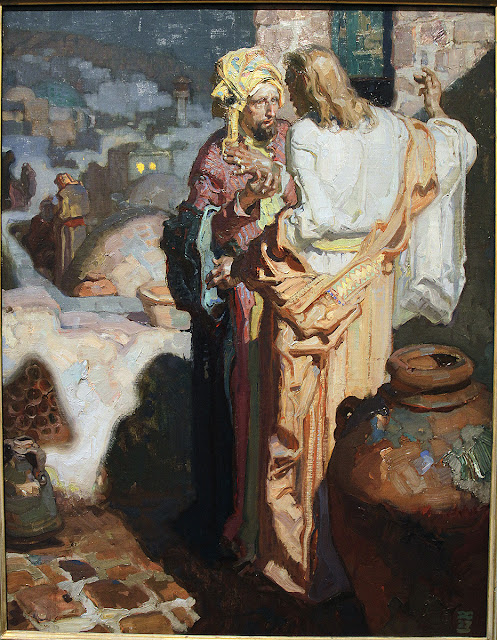
Nicodemus Comes to Jesus at Night, 1928 by Dean Cornwell
I could not end this entry without a Dean Cornwell. The effortless brushwork, how much is described in so little, mmm mmm good.


Enjoy!
Go to link Download
Sunday, October 2, 2016
Photoshop Eyes – Amazing Eyes Tutorial
Photoshop Eyes – Amazing Eyes Tutorial

Retouch eyes in Photoshop is something that many of us have tried or try sooner or later because it’s a lot of fun. Retouching can be done in so many ways in Photoshop and there are advanced and simple techniques to do it but in this tutorial we will see an easier technique to Photoshop eyes using adjustment layers and simple layer masks. Then I will also show you how you can create amazing eyes on a portrait using cat eyes.
Resources used
- Model eyes
- Cat eyes
Eyes Tutorial – Video step by step
Photoshop Eye Tutorial – How to and tips
As always we will use non-destructive techniques when we retouch anything in Photoshop. That’s the most practical way of working, especially when you work with things like eyes because maybe you want to change the look of them and you want to make sure that you have editing capabilities in the future. That’s why we are going to use adjustment layers, masks and clipping masks. We will use the Hue/Saturation adjustment layer to change the color of the eyes and the Levels adjustment layer to fix the contrast.

Photoshop Eyes Tip: don’t oversaturate the eyes unless you’re looking for a specific effect. Keep a natural look and use the Opacity or Saturation option to adjust the amount of color on the eye.
Photoshop Eyes: Use layer masks wisely for a more realistic effect with good transitions
In Photoshop CS6 and above, layer masks can be edited non-destructively. Double click the layer and the mask properties panel will open. Here you can change the feather of the mask’s edges and get better transitions if you need it.

If you’re looking for creating an amazing eyes effect in Photoshop, you can achieve that using stock images. Eyes of cats, snakes, owls or any reptile or animal that you can imagine could look good, or at least different if you put them on a portrait. In this eyes tutorial I will also show you how I replaced the eyes of a woman model in Photoshop with cat eyes and how I achieved an impressive result making basic color and contrast changes using Gradient Maps and Levels. It could well be called an Easy Cat Eye tutorial heheheh but in fact it’s a simple way of making more attractive eye effects in Photoshop.

Go to link Download
Subscribe to:
Posts (Atom)