Showing posts with label hard. Show all posts
Showing posts with label hard. Show all posts
Saturday, May 20, 2017
partition bad disk repair your old hard disk
partition bad disk repair your old hard disk
Partition Bad Disk Download here
With This application you can repair your old hard disk.
this will group the bad partition and create new partition with the good partition
Features:
•High-efficient and error-robust disk scan algorithm. You wont wait for a whole night just to see your computer hangs or makes little progress in scanning the disk.
•You can stop the scan at anytime and continue it later. PBD will save the scan results automatically so that you need not scan the disk again when you want to adjust the partitions next time.
•Almost no limitation about the number of created partitions/logical disks.
•Visualized disk diagram makes it easy to use. Just click the blocks in the diagram and assigned them to partitions. You can adjust the size of, the start/stop positions of, the type of partitions and split/combine partitions at will.
•Provided advanced partitioning strategies. Choose a strategy, and PBD does the rest.
•Super Format option allows you to mark bad clusters at file system level. This is useful if you want to create a large partition thus have to include some bad sectors in it(the bad sectors will be mapped out after formatting). It is much faster than traditional format when dealing with massive bad sectors, and it never hangs. Currently only FAT is supported. You can convert the formatted partition from FAT to NTFS using the command: convert X:/fs:ntfs
•Even your disk has no bad sectors, you can also use PBD as an ordinary easy-to-use partition software.
About bad sector:
Bad sectors(or bad blocks, bad clusters) are the areas on the disk that can not be read or written. Bad sectors are classified into two categories: logical bad sector and phyical bad sector. Logical bad sector can be repaired by software while phyical bad sector is hard to fix. Bad sectors should be blocked out, otherwise you will meet problem reading or writing files, and if bad sectors are often read and written, they may propagate to originally healthy part of disk. Use
Partition Bad Disk to isolate/hide bad sectors so that they can not be used to store files.

Go to link Download

Saturday, December 17, 2016
Question How do I move my Lightroom Photos to an external hard drive
Question How do I move my Lightroom Photos to an external hard drive
Thanks to Jim Livingston for the question…
( I ); question can I drag and drop all the pictures in the folder “My Lightroom Photos” located now on my C: drive to my external hard drive ( I ) “My Book”?
You dont want to drag and drop, You want to "export as a catalogue," that way youll have all your edits, metadata and the "originals" or negatives in the export.
In Lightrooms Library Module on the left side, locate the folder you want to Export, AND click it to highlight it…

Choose the Menu item
File > Export as Catalogue
OR
Right Click the highlighted Folder
You will get this requester first…

Choose Export this Folder as a Catalogue
Then you get the Export as Catalogue Dialogue…
Heres what to do…

1. Choose the drive or location where you want to export the Photographs and catalogue…
2. Save as… use the exact name of the folder you are exporting, in this case "AllPhotographs"
3. Do you REALLY want Lightroom to build previews for ALL your Photos ….. might take a while so, leave Build / include Smart Previews UNCHECKED
4 Click export

In the sample shown above I unchecked Export Negative Files… and exported just the database, I can use this exported database to edit my metadata and later Synchronize the added data to my originals…
Note that the export preserves your original file structure…
If I had exported the negative files (Original Photographs) They would be Inside the main folder "Photos2" The result would be a stand alone or duplicate Catalogue… with, file structure, photos, settings and database…
In the example below I exported JUST a folder named "2008-06-13" with one photograph!
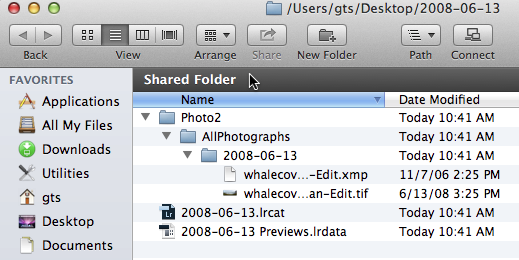
As you can see the original file structure was preserved
Go to link Download
Friday, November 18, 2016
Pengertian Harddisk Hard Drive
Pengertian Harddisk Hard Drive
Biasanya disebut dengan piranti cakram keras. Struktur penyimpanan data sekunder yang berisi piringan magnetis sebagai bagian dasar dari sistem komputer modern. Sekumpulan data yang tersimpan pada HD ini tidak akan hilang pada saat tidak dialiri arus listrik/tidak ada daya yang menyetrumnya. hal inilah yang membuat ianya berbeda dengan metode kerja memori yang mana telah saya jelaskan pada postingan sebelumnya. Harddisk merupakan transformasi dari media penyimpanan seperti radio casette atau compact disc (CD) mampu merekam data sebanyak-banyaknya sesuai dengan kesanggupan kapasitas penyimpanannya.
Perlulah Reynold Johnson berbangga hati atas penemuannya yang sangat berharga ini. Mindset yang beliau miliki mampu mengubah perjalanan jaman teknologi itu sendiri. Tahun 1956 adalah tahap permualaan seorang Insinyur IBM ini untuk memanipulasi 50 jumlah piringan aluminium dengan ukuran 2 kaki (0,6 meter) yang mampu menyimpan data sebesar 4.4 MB. Pernahkan anda melihat perangkat pemutar musik jaman dulu atau biasanya disebut piringan hitam? Biar lebih jelas mari kita perhatikan gambar yang satu ini.

Jika kita perhatikan sebuah tuas mengacu pada piringan tersebut sebagai media komunikasi yang akan merekam setiap putaran lempeng disk kemudian diubah menjadi sinyal suara, maka terdengarlah lagu The Beatles, hehehe....Yup, kalau menurut saya gambar diatas menunjukkan pemikiran persamaan antara HD dengan PH. Belum percaya? Look....

Bener kan, ada tuasnya sebagai perekam...
Nah, dalam hal ini tuas HD berfungsi sangat baik sebagai membaca dan menulis data. Namun jika kita perhatikan lebih mendetail perbedaannya cukup nyata terlihat pada komponen yang menyatu didalam perangkat itu. Piringan HD adalah kaca atau aluminium yang permukaannya dipoles dengan magnet agar tampak mengkilap dan terhindar dari debu atau kotoran yang dapat membunuh pekerajaannya sebagai media penyimpan data. Hal itu harus betul-betul dijaga karena sangat fatal kerusakannya.
Komponen Dasar penyusun dari sebuah HD dapat kita simpulkan sebagai berikut:
- Platter, inilah piringan yang disinggung tadi.
- Lengan Pembaca, kita sebut tadi tuas yang digerakkan oleh motor-linear. Mekanisme pergerakannya adalah 50 kali/satu detik
- Head (baca, tulis), sebuah perantara media fisik yang mampu melakukan perubahan dan pengaturan record and write.
Perlu kita ketahui bahwa dalam masa merekam data HD yang bergerak bukanlah lengan pembaca/tuas tetapi piringan akan menunggu drive menempatkan posisi yang tepat untuk next proses, kemudian lengan pembaca mulai bekerja sesuai dengan ukuran waktu yang ada. Waktu untuk menggerakkan lengan pembaca disebut "seek time), sementara berputarnya piringan dan berhenti pada masanya disebut "drive latency".
Cara kerja hardware ini sangat unik dimana lengan pembaca tidak bisa bersentuhan langsung dengan slatter jika waktu yang telah ditentukan belum tepat karena akan mengakibatkan "head crash" karena media magnetik piringan sangat rentan dan rapuh. Jelas anda tidak ingin kalau HD anda mendapat pesan "Bad Sector" kan? Nah, jika tidak ingin, berhati-hatilah dengan pengguna laptop/notebook. Jika mini komputer anda sedang bekerja sangat disarankan untuk tidak mengangkat dan meletakkannya dengan sembarangan karena bisa saja akan mengejut slatter yang sedang "drive latency".
Jika HD anda sudah mengalami Bad Sector, saya tidak yakin kalau masalah tersebut dapat diatasi namun kategori kerusakannya biasanya dihasapkan kepada 2 hal yaitu problem di software dan hardware itu sendiri. Anda perlu bersabar pasti akan saya posting di lain kesempatan.
Daftar Pustaka:
a. http://serpong.kompas.com/berita/detail/1683/menikmati.kenangan.piringan.hitam.di.regis.cafe
b. http://agussale.com/penjelasan-tentang-hard-disk-disk-drive-dan-hdd
c. http://id.wikipedia.org/wiki/Cakram_keras
d. http://blog.uad.ac.id/adiwicaksana
e. http://id.answers.yahoo.com/question/index?qid=20100815060052AAcoskS
f. http://dedenthea.files.wordpress.com/2007/08/hd6.jpg
Terimakasih Atas Kunjungannya....
Copyright © 2011. Sahabat Teknologi . All Rights Reserved
Go to link Download
Subscribe to:
Posts (Atom)