Friday, June 2, 2017
Pidgin IM all your friends in one place
Pidgin IM all your friends in one place
 Pidgin is a chat program which lets you log in to accounts on multiple chat networks simultaneously. This means that you can be chatting with friends on MSN, talking to a friend on Google Talk, and sitting in a Yahoo chat room all at the same time.
Pidgin runs on Windows, Linux, and other UNIX operating systems.
Download : PIDGIN 2.5.5 HERE
Plug In : mxit for pidgin
Plug In : facebook chat for pidgin
Installation:
1. install pidginnya
2. install mxit for pidgin
3. install facebook chat for pidgin
4. Open pidgin
5. Click account > Manage Account > Add User n Go
Pidgin is compatible with the following chat networks out of the box: AIM, ICQ, Google Talk, Jabber/XMPP, MSN Messenger, Yahoo!, Bonjour, Gadu-Gadu, IRC, Novell GroupWise Messenger, QQ, Lotus Sametime, SILC, SIMPLE, MySpaceIM, and Zephyr. It can support many more with plugins.
Supported chat networks:
AIM, Bonjour, Gadu-Gadu, Google Talk, Groupwise, ICQ, IRC, MSN, MySpaceIM, QQ, SILC, SIMPLE, Sametime, XMPP, Yahoo!, Zephyr, Facebook with plug in.Pidgin supports many features of these chat networks, such as file transfers, away messages, buddy icons, custom smilies, and typing notifications. Numerous plugins also extend Pidgins functionality above and beyond the standard features.
Go to link Download

Tuesday, December 13, 2016
Prank your Friends Invert their Mouse Direction for Fun
Prank your Friends Invert their Mouse Direction for Fun
I love to prank my friends either by fake calling them with different numbers or showing them some weird Blue Screen Errors on their PC that is too fake. I have posted many other pranks too you can check them all by visiting my pranks section. Well today I have something that is not that much cool but still your friends could get in dilemma when they won’t be able to click what they actually want to and would be running crazy.
Simple Tool to Invert your Mouse Direction for Fun
Now this tool does not have much configurations, you have simple settings that you can do once and let this small software run in the background and enjoy the expressions of your friend while they get confused.
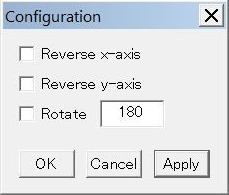
So as you can see the settings in the image on the right, you can choose what all you need to be reversed and that is it your pranking tool will execute and start the awesome fun time for you and your friends.
Download Sakasa Mouse Inverting Tool for Free
Now you can download this tool using the website its hosted on. After you have downloaded the tool just start the tool and configure it once, then ask your friends about the problem you are facing using their mouse. They will get confused about what actually happened.
Download Here
Go to link Download